During this session you will learn:
• What are the biggest challenges when it comes to maintenance reporting?
• What are the most important KPI’s to track and measure?
• How to gain the insight to better forecast and plan your maintenance;
• How to make it easier to understand and interpret data on a daily basis?
• How to improve your data-driven decision processes.
Search Results: ai data (5289)
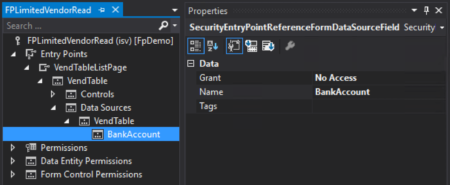
Learn how to set up field level security in D365FO.
Blue Horseshoe explains critical aspects of the upgrade process in this eight-part video series, Upgrading to Microsoft Dynamics 365 by Josh Williams, technical consulting manager at Blue Horseshoe. Learn about end of support timelines for Dynamics AX, continuous updates, data conversions, and code. upgrades.
Find out what is affecting system performance.
As the pace of business accelerates, organizations have to drive efforts to keep up with the times. For businesses using…
By Alan Wyne, Aug 27, 2020If you have been in the Microsoft Dynamics community long, then you no doubt have…
By Dan Doolin, Jun 02, 2020Reduced hours, layoffs, and even termination is wreaking havoc on US workers due to the…
By Dan Doolin, Jun 11, 2020Expanded Family and Medical Leave Act (E-FMLA) SimplifiedThe Families First Coronavirus Response Act (FFCRA) consists…
How to manage the financial cutover from a legacy system.
By Marlene Mankin, Apr 6, 2020Notifications … What are they? And how can they be utilized in Business Central/NAV?In this…
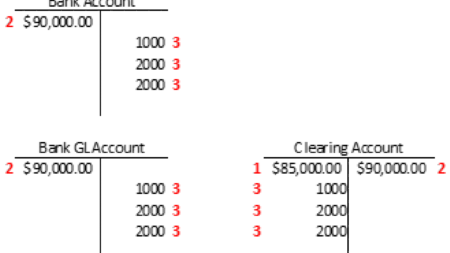
A how-to for migrating bank balances.
A very interesting dashboard was presented on a user activity on twitter. The user, Adewale Yusuf, explained his activity using the PowerBi dashboard.
By Marlene Mankin, May 8, 2020When it comes time to make a new budget, are you thrilled? Or perhaps feeling…
By Marlene Mankin, May 22, 2020It can be highly frustrating to encounter RapidStart errors and not know what to do…
Faster than a speeding bullet…more powerful than a locomotive…come join Amber Bell (Training Dynamo) in this fast-paced GP Tips session that will turn you from a GP User into a GP Superhero! Learning Objectives: Have X-Ray Vision into Company Data using SmartList Designer/Builder’s Publish to Excel functionality! Prevent Data Annihilation using Field Level Security! Move through GP ‘Faster Than a Speeding Bullet’ with a new way to create Macros!
Automate targeted marketing campaigns and more using your Microsoft Dynamics data. Check out our listing on AppSource and get started with the emfluence Marketing Platform for Microsoft Dynamics today.
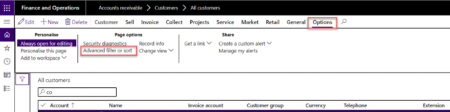
An overview of how to filter and sort on the Dynamics 365 Finance menus.
Microsoft Dynamics 365 and Microsoft Power Platform 2020 release wave 2 plans are out, check out the full listWhat’s coming…
ktIQ is an intelligent data extraction module that works with KwikPayables for GP, the industry-leading AP automation solution. ktIQ combines the power of intelligent OCR and AI for data extraction with a real-time connection to Dynamics GP for vendor data and GL code validation to index P.O. or non-P.O. based invoices. Watch this brief Coffee with KwikTag video to learn more about how ktIQ will change the way you think about AP automation.
When transitioning into a new system, there are always pitfalls and caveats that help smooth out the process. Join Val Gameiro for this session covering the things you need to keep in mind when transitioning into Business Central from NAV or any other ERP. With some foresight, planning and some data cleanup, you can make your transition as painless as possible.