


In this special Case Study, learn how Land O’Lakes analyzed and transformed their deduction operations alongside HighRadius.
In this special Case Study, learn how Land O’Lakes analyzed and transformed their deduction operations alongside HighRadius.

On this Cloud Wars Live podcast, we discuss the renaissance in high-tech manufacturing, including its impact on the millennial generation.

In this exclusive Case Study, read how North America’s leading flour supplier used HighRadius integrated receivables platform and gained outstanding results.

The CISO is becoming more prominent due to the importance of cybersecurity. Learn critical duties a CISO should embrace to counteract cybersecurity threats.
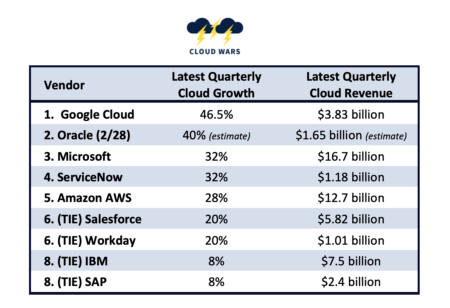
Assessing the world’s 9 most-influential cloud vendors’ growth rates, with Google Cloud’s 46.6% leading #2 Oracle and the rest.

Learn why “buy online pick up in-store” (BOPIS) remains the most profitable order, as customers purchase products online and schedule item pickup at the store

Microsoft recently submitted a recommendation to the US government about incentivizing tech adoption best practices to combat supply chain security threats.

Microsoft has rolled out new vaccine-management solutions after initial failure, triggering a response from Salesforce CEO Marc Benioff.

Pablo Moreno shares his essential points to designing and publishing a dashboard so your audience can consume data analytics better.

Zenlayer, a thriving multinational cloud services provider, partnered with BCS to upgrade their software applications to Business Central.

In a video interview with two executives from Morgan Stanley, Microsoft CEO Satya Nadella made some remarkable statements.
Introducing a new series called “Cloud Migration Inside the Pivot,” John Siefert shares a few of the leading questions/concerns of starting the cloud process.

Marsden Group, an advanced-technology boutique in the industrial sector, is the latest acquisition for Microsoft and its Manufacturing Cloud.

Why are businesses deciding to move some or all of their apps to Oracle from SAP? Oracle EVP Steve Miranda may know best of anyone.

Incorporating date-driven pricing into your strategy is crucial for staying ahead of your competition and optimizing profits.

On Oracle’s March 10 earnings call, CEO Safra Catz quietly offered 6 numbers indicating the best is yet to come for Oracle Cloud.

SAP has a chance to bounce back aggressively in the wake of Wednesday’s jarring disclosures from Larry Ellison about customer defections.

NLP is a powerful tool…if used with purpose towards actionable outcomes. In this episode, I examine natural language processing and what it means for you.

Are Power Users and Citizen Developers the same thing? Where do you draw the line? Check out my take on this topic and decide which one you are.

With the continuing uncertainty of the pandemic and the ever-present need to cut costs, now is the time to consider AP automation if you haven’t already.