Cloud Wars
  • Home
  • Top 10
  • CW Minute
  • CW Podcast
  • Categories
    • AI and Copilots
    • Innovation & Leadership
    • Cybersecurity
    • Data
  • Member Resources
    • Cloud Wars AI Agent
    • Digital Summits
    • Guidebooks
    • Reports
  • About Us
    • Our Story
    • Tech Analysts
    • Marketing Services
  • Ask Copilot
  • Agentic AI Battleground
Twitter Instagram
  • Summit NA
  • Dynamics Communities
  • AI Copilot Summit NA
  • Ask Cloud Wars
Twitter LinkedIn
Cloud Wars
  • Home
  • Top 10
  • CW Minute
  • CW Podcast
  • Categories
    • AI and CopilotsWelcome to the Acceleration Economy AI Index, a weekly segment where we cover the most important recent news in AI innovation, funding, and solutions in under 10 minutes. Our goal is to get you up to speed – the same speed AI innovation is taking place nowadays – and prepare you for that upcoming customer call, board meeting, or conversation with your colleague.
    • Innovation & Leadership
    • CybersecurityThe practice of defending computers, servers, mobile devices, electronic systems, networks, and data from malicious attacks.
    • Data
  • Member Resources
    • Cloud Wars AI Agent
    • Digital Summits
    • Guidebooks
    • Reports
  • About Us
    • Our Story
    • Tech Analysts
    • Marketing Services
  • Agentic AI Battleground
    • Login / Register
Cloud Wars
    • Login / Register
Home » Dynamics 365 System Administrators: Global Search Configuration Tools – CRM Heidi
Business Apps

Dynamics 365 System Administrators: Global Search Configuration Tools – CRM Heidi

Heidi NeuhauserBy Heidi NeuhauserApril 7, 20211 Min Read
Facebook Twitter LinkedIn Email
Share
Facebook Twitter LinkedIn Email

Learn how to update Global Search in Dynamics 365: modify the 3 columns displayed in the search results and add or remove tables searched.

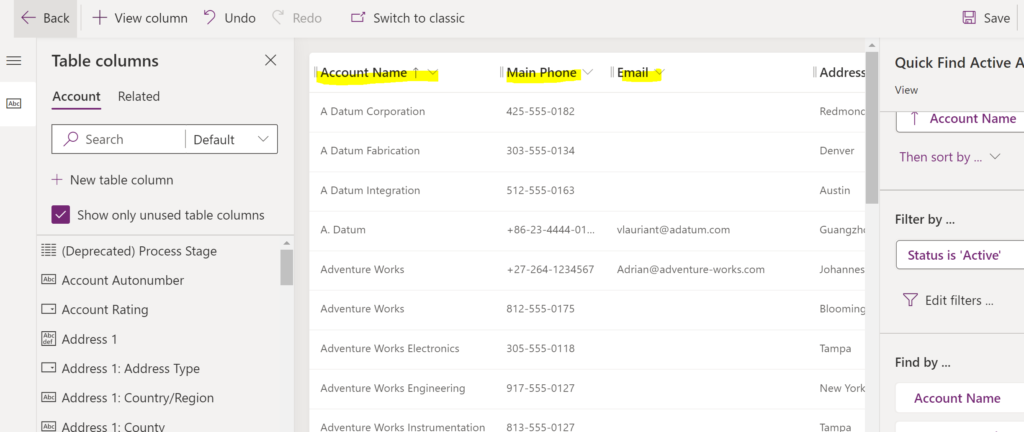
Today, I’m going to show you how to update two things with Global Search in Dynamics 365:

  1. Modifying the three columns (fields) displayed in the search results screen.
  2. Adding/removing tables (entities) searched.

Both of these items are done using extremely simple configuration – anyone with system administrator or system customizer security permission levels can do this.


Share. Facebook Twitter LinkedIn Email
Heidi Neuhauser

Microsoft MVP, Business Applications. Specialties: Microsoft Dynamics CRM, Dynamics 365, Power Platform, CDS, Power Automate, user adoption expert, project management, corporate training, sales process, sales operations, automation, workflows, business process flows, PowerApps, change management, customer service process, marketing automation, rescue projects. CRMUG All-Star ⭐

Related Posts

Marc Benioff and AI Reignite Salesforce’s Once-Legendary Superpower

December 8, 2025

AI Agent & Copilot Podcast: enVista’s Nathan Bensch Talks Dataverse, Governance, and Agent Design

December 8, 2025

SAP Remains Hottest Enterprise-Apps Vendor by Far; Workday #2, Oracle #3, Salesforce #4

October 27, 2025

AWS Outage Fixed But Damage to Reputation Is Devastating

October 23, 2025
Add A Comment

Comments are closed.

Recent Posts
  • SAP Pumps Up Agentic AI and Data Chops with Reltio Acquisition
  • Microsoft and Third-Party Agents Build Out Security Copilot Ecosystem
  • SAP + Reltio: Fueling Agentic AI Via Harmonized Data
  • AI’s Strange Bedfellows: Google Cloud and 100-Year-Old Baker Hughes Catch AI Lightning
  • Accounts Payable Reimagined: ERP-Native Automation in Dynamics 365

  • Ask Cloud Wars AI Agent
  • Tech Guidebooks
  • Industry Reports
  • Newsletters

Join Today

Most Popular Guidebooks and Reports

Accounts Payable Reimagined: ERP-Native Automation in Dynamics 365

March 30, 2026

elevaite365 Test Automation: Turning Software Testing into a Strategic Asset with AI

March 6, 2026

Driving Business Transformation with Agentic AI and ServiceNow

January 9, 2026

The Agentic Enterprise: How Microsoft and Industry Leaders Are Redefining Work Through AI

September 2, 2025

Advertisement
Cloud Wars
Twitter LinkedIn
  • Home
  • About Us
  • Privacy Policy
  • Get In Touch
  • Marketing Services
  • Do not sell my information
© 2026 Cloud Wars.

Type above and press Enter to search. Press Esc to cancel.

  • Login
Forgot Password?
Lost your password? Please enter your username or email address. You will receive a link to create a new password via email.
body::-webkit-scrollbar { width: 7px; } body::-webkit-scrollbar-track { border-radius: 10px; background: #f0f0f0; } body::-webkit-scrollbar-thumb { border-radius: 50px; background: #dfdbdb }