Cloud Wars
  • Home
  • Top 10
  • CW Minute
  • CW Podcast
  • Categories
    • AI and Copilots
    • Innovation & Leadership
    • Cybersecurity
    • Data
  • Member Resources
    • Cloud Wars AI Agent
    • Digital Summits
    • Guidebooks
    • Reports
  • About Us
    • Our Story
    • Tech Analysts
    • Marketing Services
  • Summit NA
  • Dynamics Communities
  • Ask Copilot
Twitter Instagram
  • Summit NA
  • Dynamics Communities
  • AI Copilot Summit NA
  • Ask Cloud Wars
Twitter LinkedIn
Cloud Wars
  • Home
  • Top 10
  • CW Minute
  • CW Podcast
  • Categories
    • AI and CopilotsWelcome to the Acceleration Economy AI Index, a weekly segment where we cover the most important recent news in AI innovation, funding, and solutions in under 10 minutes. Our goal is to get you up to speed – the same speed AI innovation is taking place nowadays – and prepare you for that upcoming customer call, board meeting, or conversation with your colleague.
    • Innovation & Leadership
    • CybersecurityThe practice of defending computers, servers, mobile devices, electronic systems, networks, and data from malicious attacks.
    • Data
  • Member Resources
    • Cloud Wars AI Agent
    • Digital Summits
    • Guidebooks
    • Reports
  • About Us
    • Our Story
    • Tech Analysts
    • Marketing Services
    • Login / Register
Cloud Wars
    • Login / Register
Home » Expense Management Using Policies in Microsoft Dynamics 365
Financial Tech

Expense Management Using Policies in Microsoft Dynamics 365

Jarrod KraemerBy Jarrod KraemerMay 21, 2021Updated:June 9, 20214 Mins Read
Facebook Twitter LinkedIn Email
Share
Facebook Twitter LinkedIn Email

Chances are that your organization has employee expenses that need to be closely managed. Whether you have employees needing to book travel expenses daily or just the occasional business dinner, it is important to have tight control over how each employee’s expenses are submitted and approved. Microsoft Dynamics 365 has powerful expense management tools which allow your employees to submit expense reports while ensuring that business rules are followed and that all relevant information and documents are included. This blog will go over the setup and functionality of expense policies.  
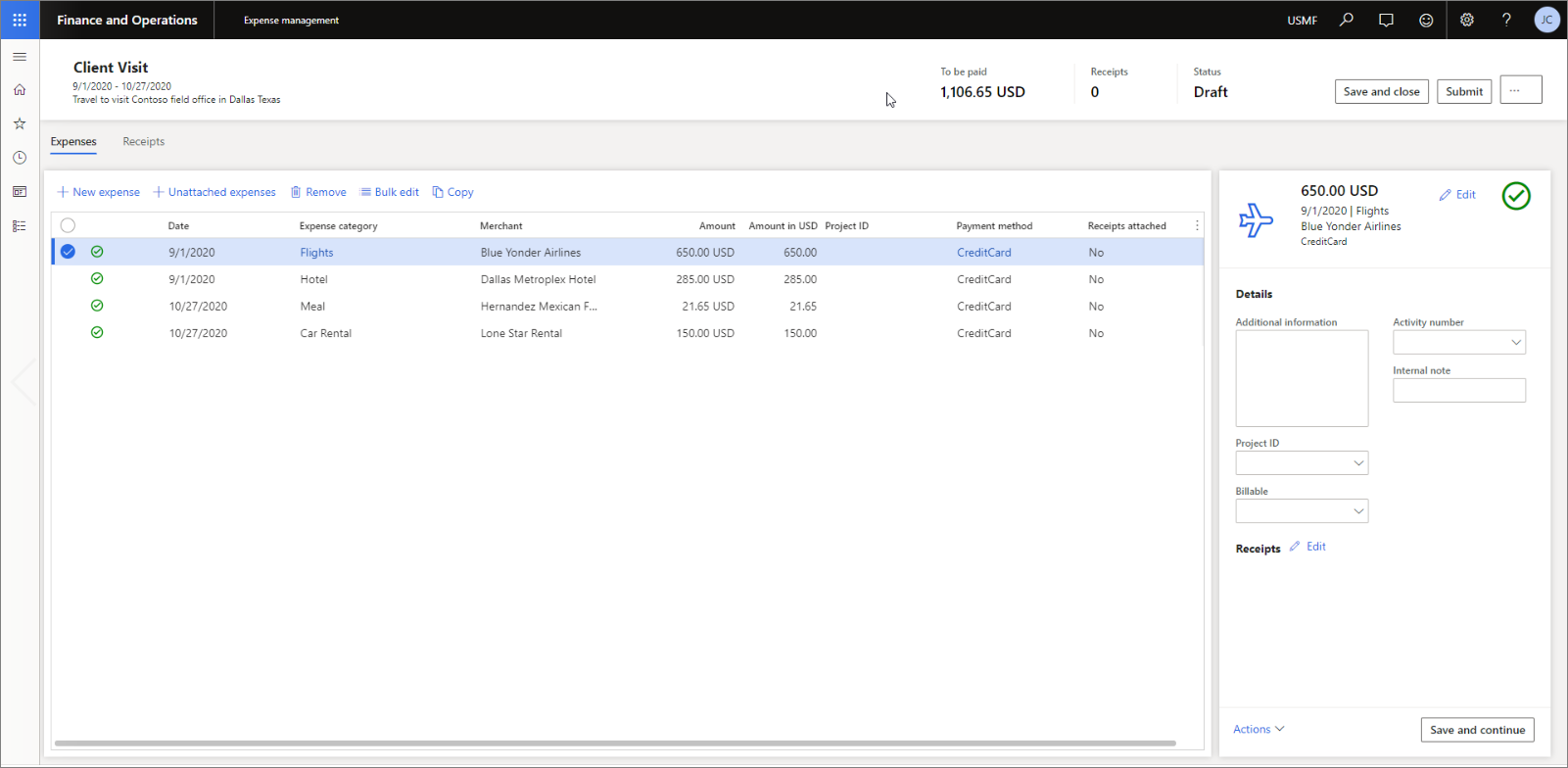
The Expense management workspace is the landing page for creating and submitting expense reports. 

When entering an expense report line, at the bare minimum, expense category, transaction date, payment method, and transaction amount are mandatory – users will not be able to submit the report without entering all this information. This basic setup ensures that your organization at least gets this necessary information from the expense report. If your organization has more strict requirements and rules for expense report entry you may want to define policies that your employees must follow when entering and submitting expense reports.

Expense Policies

Expense policies in Dynamics 365 are a set of rules that an employee must adhere to before being allowed to submit an expense report. You can define policies that your workers must follow when entering and submitting expense reports and travel requisitions. Implementing expense policies can help you manage expenses effectively. This will allow your organization to manage expenses more efficiently and effectively. The system will ensure that an expense report follows all defined business rules before being pushed to the approver.

The following are a couple of examples where an expense policy may be used:

  • Your company has a policy that travel meal expenses cannot exceed the amount of $25/meal.
  • Your company has a policy that an expense report line exceeding $20 must include a receipt.

For the above examples, and many other situations, expense policies can be configured to give the user a warning, an error, or require a justification. If the user is given a warning the system allows the worker to submit an expense report, but the expense will be marked for all approvers and future reporting. If the user is given an error the system requires the worker to revise the expense to comply with the policy before submitting the expense report. If the entry requires justification the worker must enter a justification for exceeding the policy amount before submitting the expense report.

To set up an expense policy:
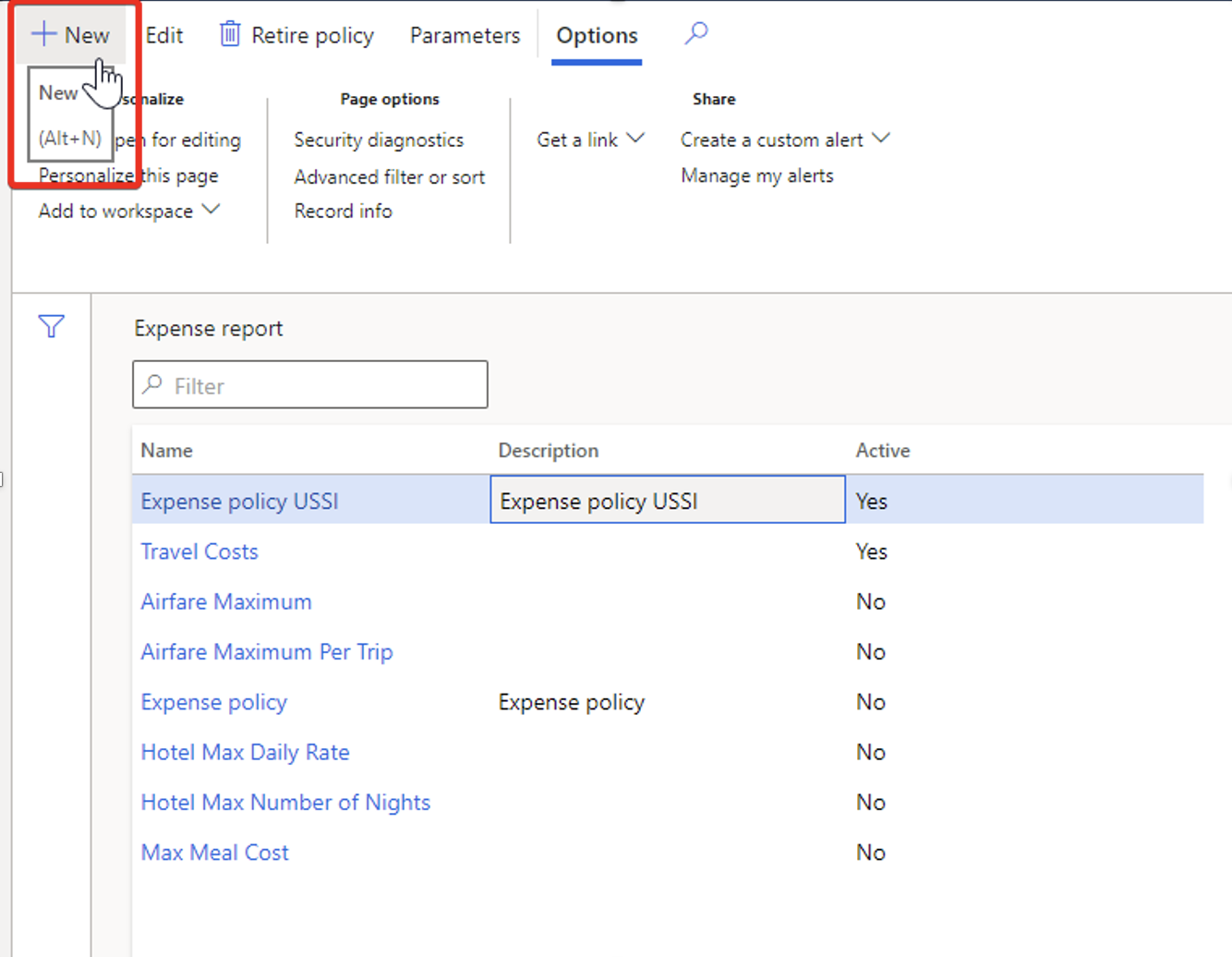
1)    Navigate to: Expense Management > Setup > Policies > Expense Report

2)    Select New > Policy

3)    Enter a name and description for the policy

4)    Choose what legal entities the policy will apply to

5)    Expand the policy rule tab and select the type of policy rule that you would like to create, for example: Receipts Required

6)    Click on Create policy rule

7)    Choose an effective date and expiration date

8)    Choose a condition, for example: If the expense line amount is > $20

9)    Choose a do the following, for example: Do not allow the user to submit or approve and display an error message

10) Enter an error message by clicking on the symbol just below the message box.

11) Click OK and your expense policy will be created.
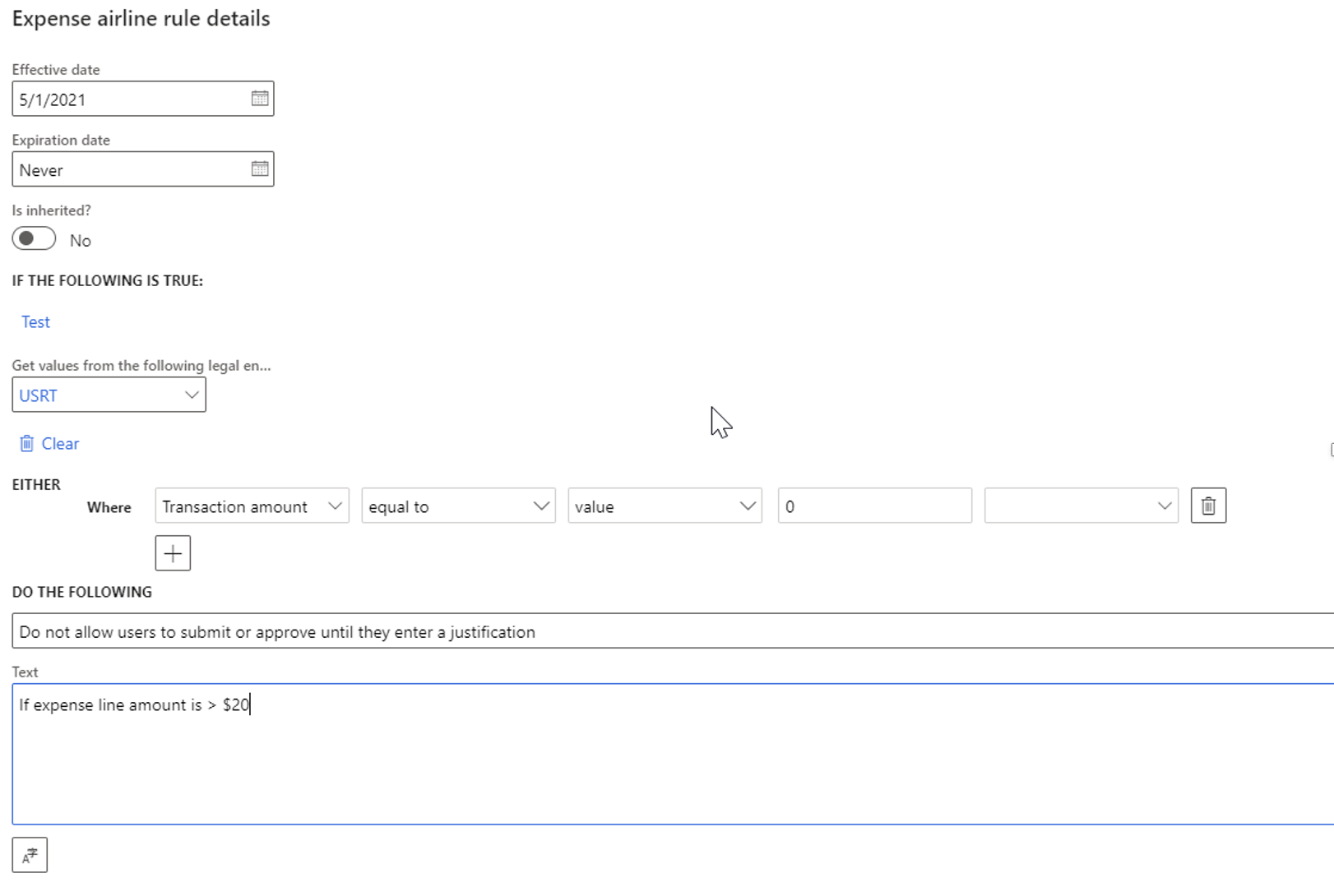
Once you have your expense policies configured you can rely on the system to prevent expenses that are outside of business policies to be approved.

Next Steps  

If you are interested in learning more about expense management as well as maximizing the use of Microsoft Dynamics 365 for Finance and Supply Chain Management contact us here to find out how we can help you grow your business. You can also email us at info@loganconsulting.com or call (312) 345-8817.

Interested in Logan Consulting?

Schedule a discovery meeting to see if we can help achieve your goals

Connect With Us

Book a Demo

Dynamics 365 CE / CRM
Share. Facebook Twitter LinkedIn Email
Jarrod Kraemer
  • Website

Jarrod joined Logan Consulting in 1999. He is focused on business development for the Microsoft Dynamics 365 for Finance & Supply Chain Management practice. Jarrod has proven software and consulting experience in a wide variety of industries, including Manufacturing, Distribution, Automotive, Pharma/Life Sciences, and Professional Service Industries. He possesses a well-developed-ability to think strategically and understand client's needs.  Jarrod holds a BA in Business Management from the Carlson School of Management at the University of Minnesota as well as a BA in Business and Industry Education from the University of Minnesota. Logan Consulting helps manufacturing, distribution, and professional service organizations use technology to reduce costs and increase sales resulting in higher company profits. Our firm specializes in running or augmenting complex projects, primarily in the Microsoft Dynamics 365 Finance and Supply Chain Management. We use a business process-driven approach to ensure we achieve the cost savings and other value creation while simplifying the technology deployment to reduce risk and cost.

Related Posts

Marc Benioff and AI Reignite Salesforce’s Once-Legendary Superpower

December 8, 2025

Community Summit NA: Microsoft Empowering Customers at the Frontier of AI Transformation

October 24, 2025

Day 4: Community Summit North America 2025 Concludes with AI Driving Real-World Transformation

October 23, 2025

AWS Outage Fixed But Damage to Reputation Is Devastating

October 23, 2025
Add A Comment

Comments are closed.

Recent Posts
  • Google Launches Unified MCP Support Across Its Services
  • Microsoft Fills in Agent 365 Management, Governance Details Through New Public Demos
  • AI Agent & Copilot Podcast: Microsoft’s Grant Dess Provides AI Agent & Copilot Summit Insights
  • AI-Enhanced Security: ServiceNow’s Bold Move with Armis
  • The Agentic Enterprise Arrives: Microsoft’s Copilot and Agent Breakthroughs of 2025

  • Ask Cloud Wars AI Agent
  • Tech Guidebooks
  • Industry Reports
  • Newsletters

Join Today

Most Popular Guidebooks and Reports

The Agentic Enterprise: How Microsoft and Industry Leaders Are Redefining Work Through AI

September 2, 2025

SAP Business Network: A B2B Trading Partner Platform for Resilient Supply Chains

July 10, 2025

Using Agents and Copilots In M365 Modern Work

March 11, 2025

AI Data Readiness and Modernization: Tech and Organizational Strategies to Optimize Data For AI Use Cases

February 21, 2025

Advertisement
Cloud Wars
Twitter LinkedIn
  • Home
  • About Us
  • Privacy Policy
  • Get In Touch
  • Marketing Services
  • Do not sell my information
© 2025 Cloud Wars.

Type above and press Enter to search. Press Esc to cancel.

  • Login
Forgot Password?
Lost your password? Please enter your username or email address. You will receive a link to create a new password via email.
body::-webkit-scrollbar { width: 7px; } body::-webkit-scrollbar-track { border-radius: 10px; background: #f0f0f0; } body::-webkit-scrollbar-thumb { border-radius: 50px; background: #dfdbdb }